
User Guide / Products
Combo products
A combo bundles several products under one SKU: a Galaxy A15 Starter Bundle made of the phone, a charger and a case. You sell the combo in one scan, and ekPOS takes each component out of stock.
How combos work
- A combo holds no stock of its own. Selling one takes its components out of stock.
- A combo is never priced by hand. Its price is the sum of its components' current selling prices, optionally less a discount.
- When you sell a combo, its components go on the sale as separate lines, each at its own price. Receipts, reports and e-invoices therefore show exactly what was sold.
Create a combo
- Go to Products → Add Product and choose Combo.
- Enter the name, and optionally SKU, barcode, category and brand.
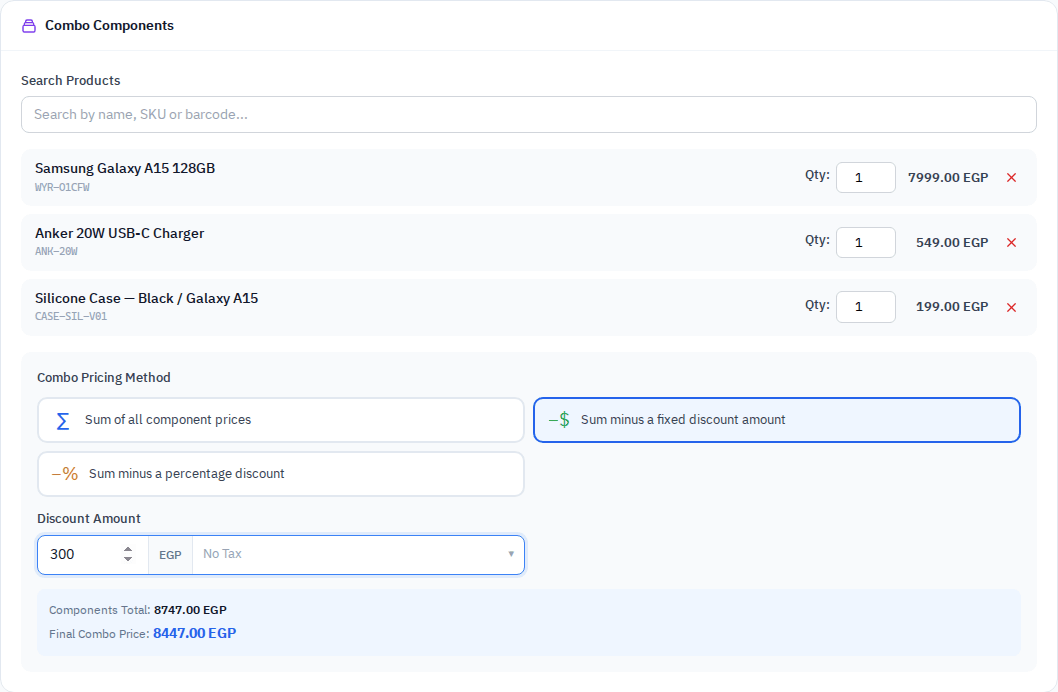
- In Combo Components, search by name, SKU or barcode and click a result to add it. For a variable product, pick the exact variant.
- Set the Qty of each component in the bundle.
- Choose the Combo Pricing Method:
| Method | Price of the combo |
|---|---|
| Sum of all component prices | The components' selling prices added up. |
| Sum minus a fixed discount amount | The sum, less the amount you enter. |
| Sum minus a percentage discount | The sum, less the percentage you enter. |
- Check Components Total and Final Combo Price at the bottom, then click Save.
What happens at the till
- A percentage combo discount is applied to every component line.
- A fixed combo discount is added to the sale's invoice discount, because a fixed amount cannot be split evenly across lines.
- The till does not ask for serial numbers of components sold inside a combo. If you need a serial on record, sell that product as its own line.
- A combo with no components cannot be sold: This combo has no components, so there is nothing to sell.
Keeping combo prices current
Because the price comes from the components, changing a component's selling price updates every combo that contains it. You don't need to edit the combo.
Editing a combo
On Edit, the component list and pricing method are shown as saved. Components you remove are dropped; components you add are included. Changing a combo into a single or variable product removes its component list.