
Opening stock
Opening stock is the quantity of a product you already hold when you start using ekPOS for it. It is entered once per product, for each location.
Two places to enter it
- While adding the product — the Opening Stock section of Add Product has a box for each active location.
- Afterwards, from the product list — open ⋮ → Opening Stock on the product, enter a quantity for each location, and click Save.
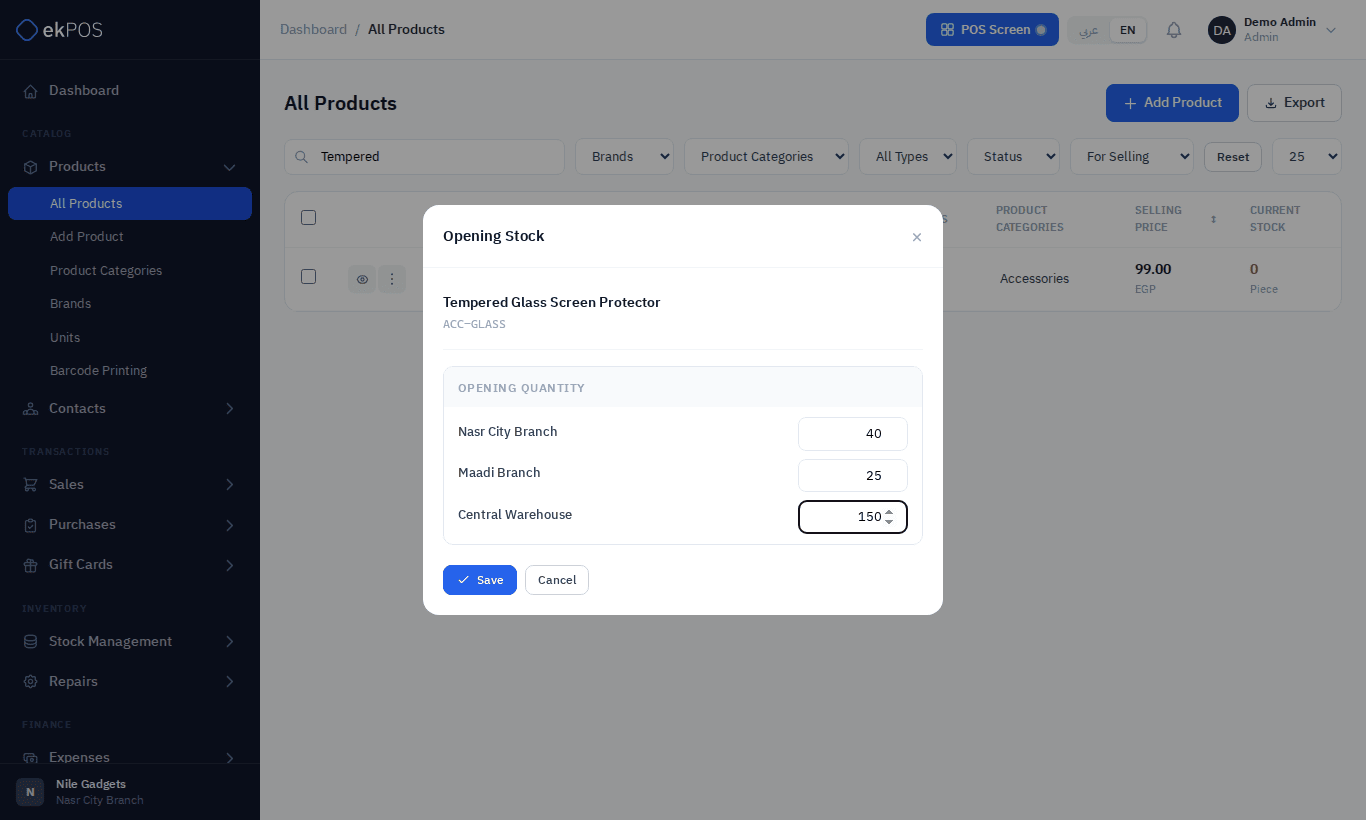
For a variable product, the Opening Stock window has a quantity for each variant at each location.
Quantities can't be negative. Leave a location at 0 if you hold none there.
For many products at once, use Import opening stock.
When it is available
Opening stock can be entered only while the product has no stock history: no purchase, sale, transfer, adjustment or return, and no quantity above zero anywhere. The Opening Stock menu item disappears as soon as there is any, and ekPOS refuses it with Opening stock can only be added to products with no prior stock history.
To change stock after that, use a stock adjustment: Found to add, Lost or Stock Recount to correct.
What it records
The quantities are set as the product's stock at each location, dated to when you opened the form. Opening stock does not create a purchase, so it doesn't affect supplier balances or purchase reports.
On plans with accounting, opening stock is posted to your accounts at the product's purchase price: it goes into Inventory, against Owner's Equity — it is stock the business already owned. Set the purchase price before entering opening stock, so it goes in at the right value. Don't also include this stock in opening balances.
Related
- How stock works
- Variable products — about opening stock on variants